
Build an Apex Framework for OpenAI integration
Simplify free-text parsing during legacy migration with an evolving Apex OpenAI framework.

In this post, we’re going to flip our last post Using Flows to integrate with OpenAI and simply free-text parsing on its head and build the same solution as a modular Apex framework for connecting to OpenAI.
This post reflects the buildout and assumptions laid out in the flow-based post, so do check that out before reading this one - I’ll try and keep repeating myself to a minimum.
Sidebar: It’s my honest, strong belief that writing code is like writing literature. That is, everyone writes differently while getting the same message across. The framework described below is how I would write it - not a definitive end-all-be-all approach. If you want to use pascalCase versus CamelCase on your methods go for it (though you’d be wrong #DotNetShotsFired). Want to rework the framework using different classes? Make it so.
Basically, the ideas presented here are just that - ideas and my recommendations on how I would approach a module Apex framework for OpenAI. But, like writing, folks like different styles. The ideas here can be molded to suite your style of coding.
The full code for this solution can be found in the Saqsuatch with a Keyboard Github repo and is free to use for your projects and learning efforts!
The Scenario - recap
To quickly recap our scenario, we’ve got a Stock__c object with a text-entry field called Legacy_Data__c. The data in this field was pulled from a legacy system’s free-form text entry column. Out of this text, we want to parse out the ticker symbol, company name, number of shares and purchased date. And we want to be efficient and do it through AI.
The Apex Framework Architecture
Sure, we could just write one giant Apex class to do all this, but where’s the fun in that. Let’s knock it up another notch and make this the start of a fully-fledged Apex framework for building out any OpenAi integration to the ChatCompletion API.
To that end, we’re going to build four base classes:
oAI_Request: This class is going to be a modular class full of sub-classes and assessor methods for properties. Because OpenAI’s API is strictly-structured, we can build out modular classes to contain properties for the expected (and optional) request inputs, making our life easier for future integrations.
oAI_ChatCompletionCallout: This modular class will handle the actual setup of the request body, the callout to OpenAI’s ChatCompletion API and subsequent capture of the response. Due to its modular and abstract nature, this class will work hand-in-hand with the oAI_Request class to allow us to make any callout to OpenAI’s ChatCompletion API.
oAI_StockDecoder: This class will be our functional class for our stated goals (decoding legacy data on the Stock object) and will contain functions-specific logic.
InvocableStockDecoder: This class is as basic as it gets and simply provides and entry point from a flow (which we’ll use to capture selected records in a ListView) and invokes the oAI_StockDecoder class for processing. We need this class because it’s 2025 and somehow this is still the best way to invoke apex from list views.
The idea of this framework is the oAI_Request and oAI_ChatCompletionCallout classes provide us all the necessary plumbing for our integration. These classes can be extended to add newly-used properties as desired, but should provide the bulk of the work.
When a new integration needs to be created, only the “functional” class (oAI_StockDecoder) containing the logic specific to the integration needs to be built.
This framework approach with multiple classes creates a Separation of Concerns among our Apex, creating a modular, reusable framework that is flexible enough to be adapted to multiple use cases.
Setting the foundation: oAI_Request class
Our foundation class is the oAI_Request class which provides class definitions and assessor methods (also know as getter/setter method) for each property we expect to be able to get or set in the body of our request
For those following alongside the flow-based version, this is analogous to what Salesforce creates with its Dynamic Apex classes, except here we have full control! Let’s take a look at our full class, and break it down:
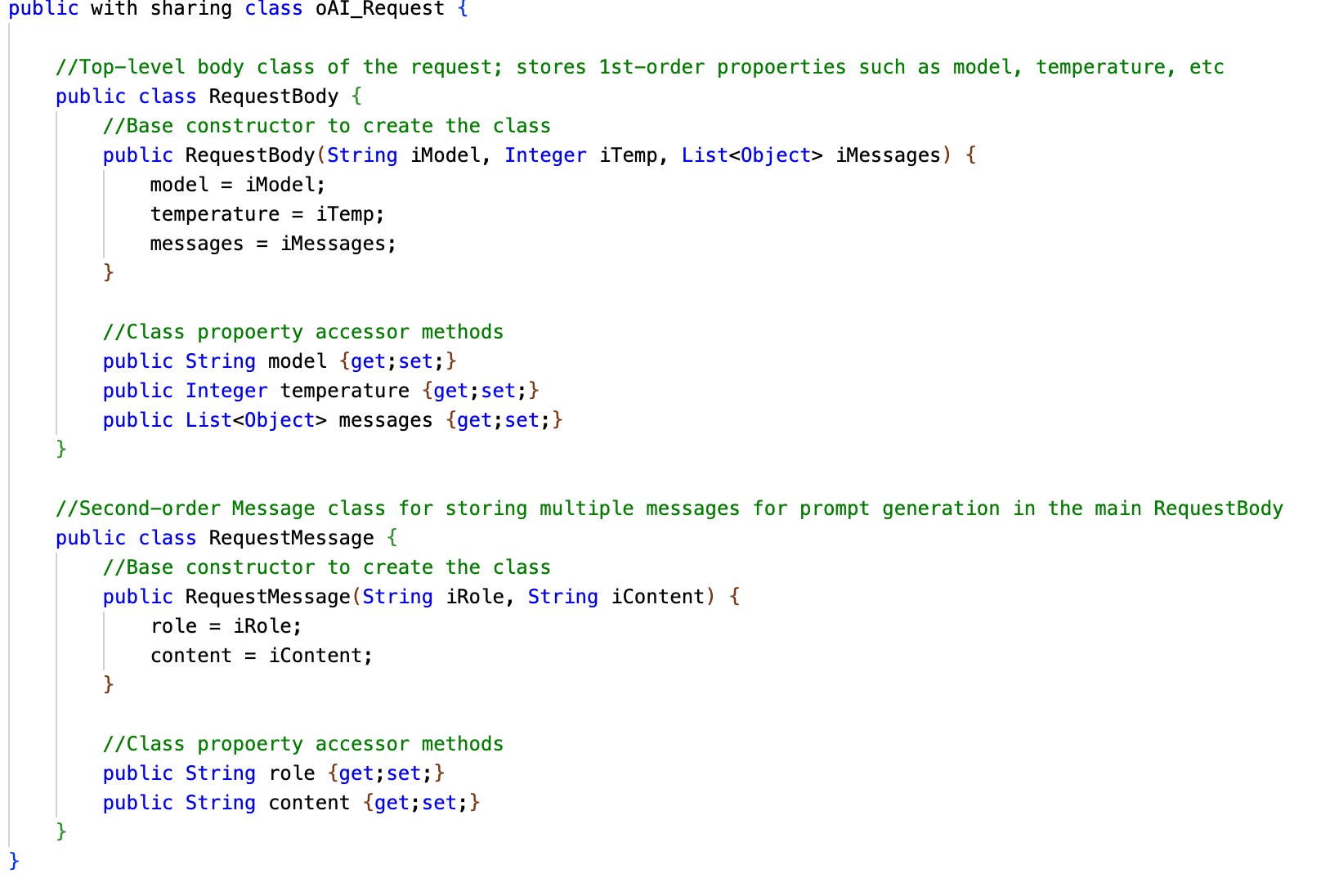
The class is actually two inner classes made up for a constructor and accessor methods for properties inside that class, mirroring the expected input of the two-ordered (nested) JSON body OpenAI expects us to provide.
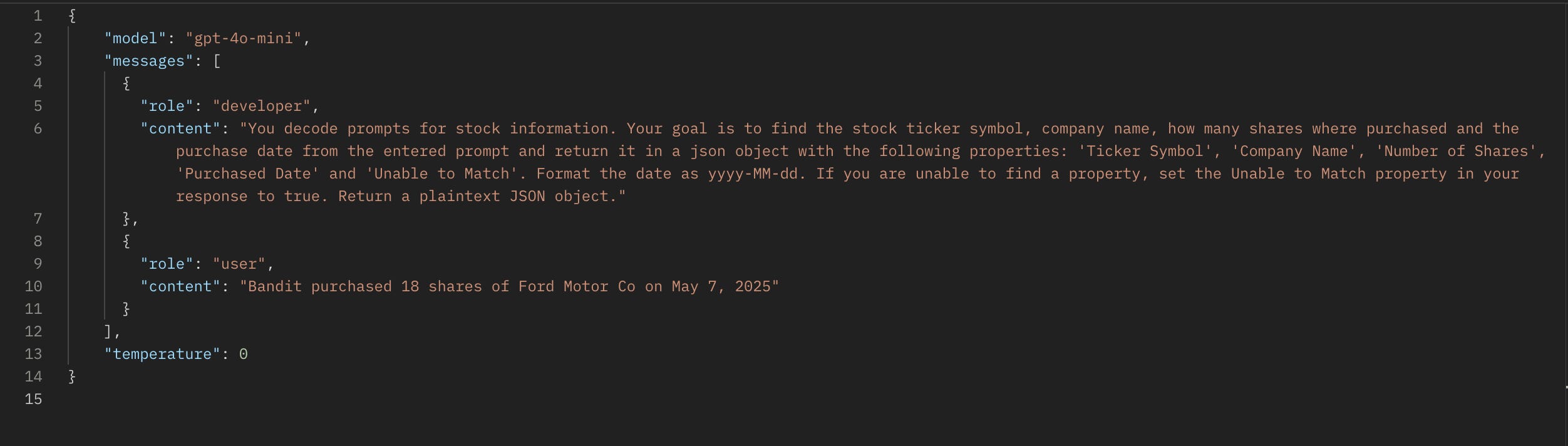
The RequestBody class contains the definition of the first-order JSON properties (the ones in the first level of nesting), while the RequestMessage class allows multiple definitions of the second-order (messages) properties.
That’s it; thanks to the structured nature of OpenAI’s ChatComplete API, we can essentially create a ‘generated from WSDL’ version of the API in these two inner classes. The idea is the invoking class (oAI_ChatCompletionCallout) will create the various body elements using constructors and set properties using the accessor methods. The only time this class will require updating is if we are wanting to add a new property for our body (eg. frequency_penalty, static, etc).
Putting in the plumbing: oAI_ChatCompletionCallout class
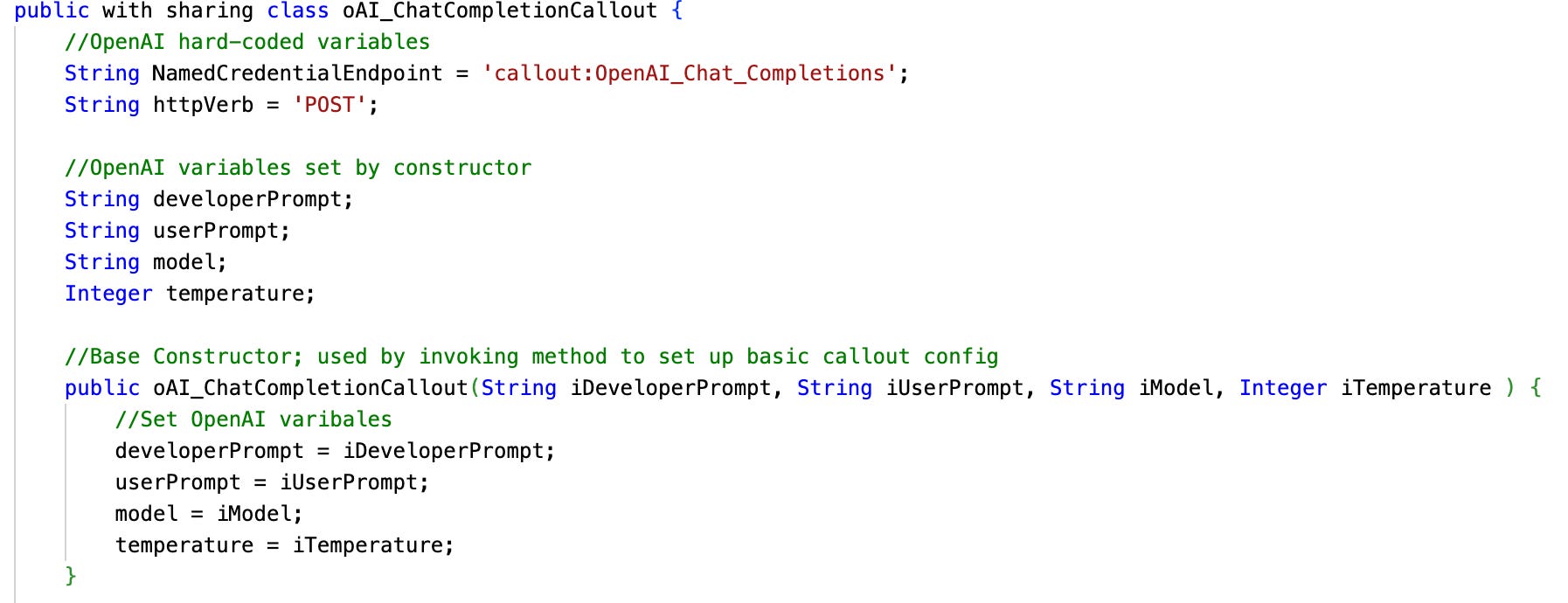
Using the oAI_Request class as its foundation, this class provides a modular way to create the request body and make the callout to OpenAI.
The idea here is with new functional requirements, the oAI_ChatCompletionCallout class can be extended with new properties by adding them as class variables and extending the constructor and helper method logic.
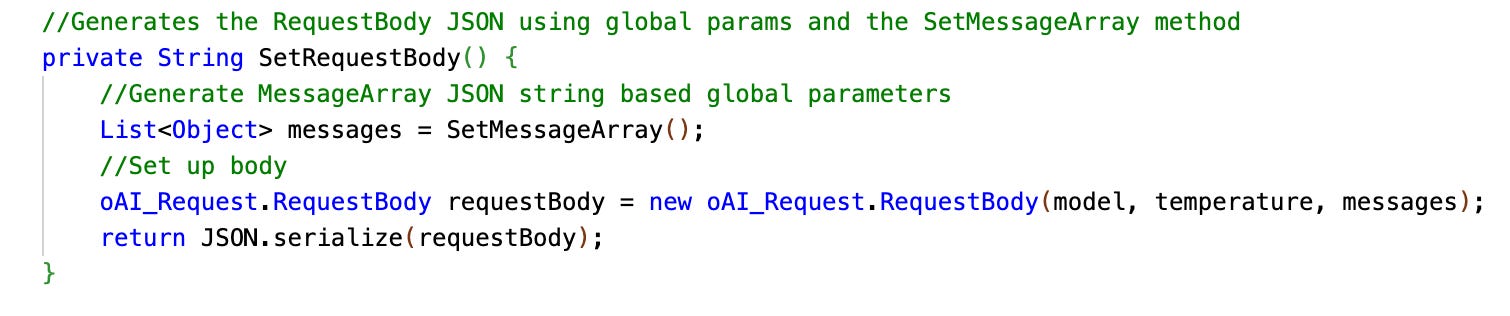
The SetRequestBody() helper method is called by the main body and works together with the SetMessageArray() helper method and the oAI_Request class and the inner-class constructors to set up our full request body.
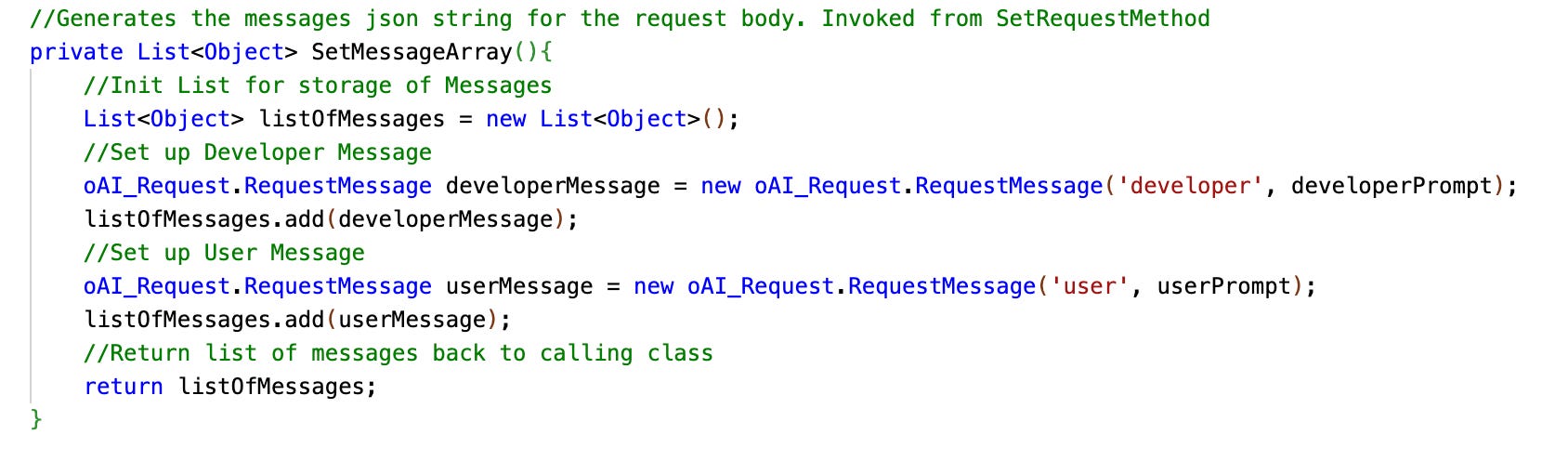
The SetMessageArray() helper method creates two instances of our RequestMessage inner class storing prompt data for the two roles (developer and user). All of this is passed back to the MakeOpenAiCallout() method as a single serialized JSON string, using the JSON class
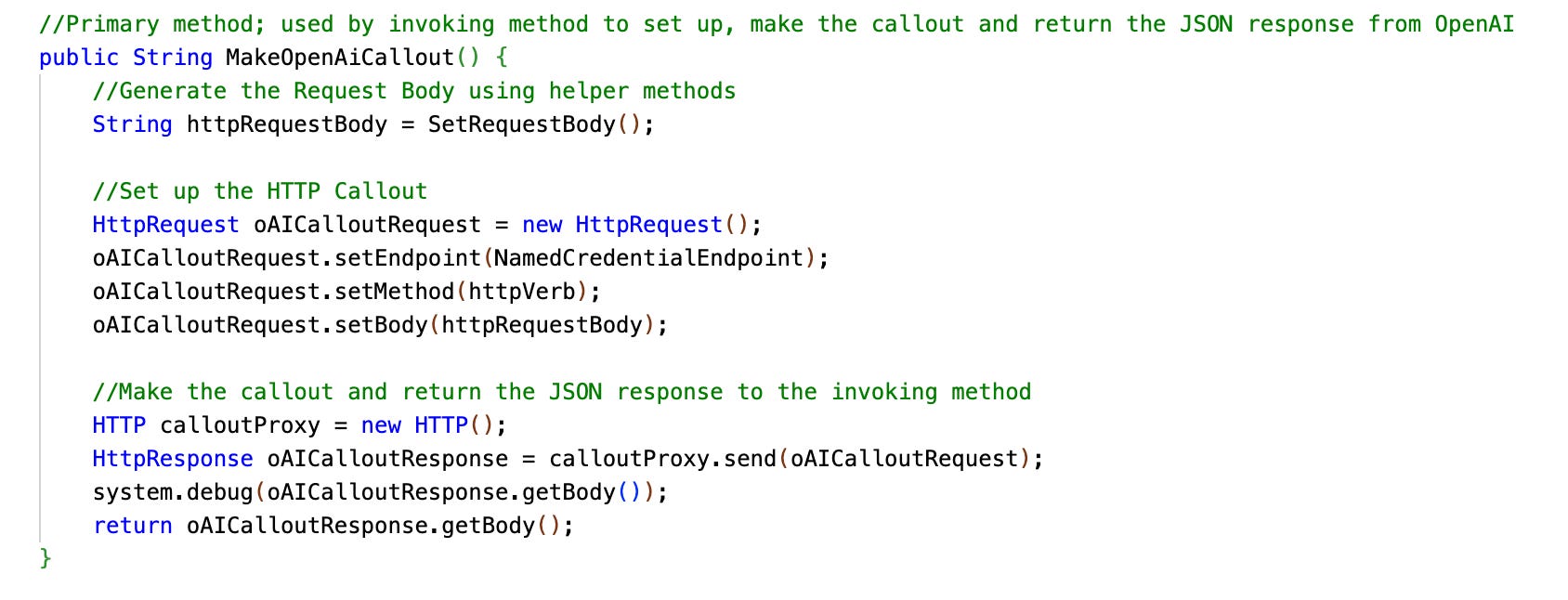
With the body set and passed back to the MakeOpenAiCallout() method, we create a new instance of the HttpRequest class from the Apex library and set the body we just generated as well as the endpoint and method (more on endpoint in a second).
The method then uses the HTTP class from the apex library to send our request on its merry way, captures the response from OpenAI and returns it back to our calling method
Handling the Endpoint & authentication
Keen-eyed readers might notice something funky; we have not defined our base URL or provided our Bearer Auth token in our class. And seasoned Apex folks probably are pulling a ‘pointing Rick Dalton’ at line ten in the class:
String NamedCredentialEndpoint = 'callout:OpenAI_Chat_Completions';This line reference the use of Named Credentials as Endpoints for Apex callouts, an excellent framework to implement in any of your Apex integrations. The linked article above goes into full detail but in short, instead of hard-coding our Bearer token and URL (or any auth information), we leverage Named and External Credential stores to handle this for us.
Recall from the Intro to Flow Http Callout post that we can use Named and External credentials to store connection data that can then be referenced in flows. This data can also be referenced in Apex.
Our External Credential stores our Bearer Auth token as an Auth Parameter in the principal and delivers it as a custom header, and our Named Credential stores the URL endpoint and a custom header identifying our body data as application/JSON. Again, all this is covered in earlier posts in greater details, so if you are scratching your head here, check them out to get up to speed.
That NamedCredentialEndpoint variable uses a keyword-based value (callout:<NamedCredentialApiName>, and at runtime, Apex will decode this into the data provided by the named credential. All of our authentication, our headers and our endpoint are handled in one simple configuration. Slick.
Painting the walls: oAI_StockDecoder class
We’ve got the house built, now let’s add some proverbial function; this class contains all of the specific logic for this specific task. That is:
Setting up the query to get our list of Stock records
Calling the oAI_ChatCompletionCallout.MakeOpenAiCallout() class to make the callout
Parsing the JSON response to get our content
Updating the Stock records with the new data
At the top we’ve got our function-specific variables. These are passed to the modular classes and allow us to set what model, temperature and prompts we want to use. Again, with future iterations and new features, this can be extended to use additional OpenAI request properties.

The single method in this class, RunStockDecoder(), expects to take in a list of Salesforce Ids (remember, we’ll be invoking this from a list view like the flow version). We run a query to get the stock records based on our list of ids and a simple for-loop iterates over each one, where we begin by setting the userPrompt to be sent to OpenAI as the value of our Legacy Data field.

We then call our modular ChatCompletion method to set up the body, make the callout and return the response back for processing. All that modular prep-work above makes our OpenAI callout all of two lines of code (…well, plus the set of the properties), and now any future applications using ChatComplete can follow this same design pattern. Fast and neat. We wrap up by parsing the returned JSON response using the JSON apex library class and deserializing it into an untyped object; specifically a Map of key-value pairs for reference.

How do you solve a problem like nested JSON
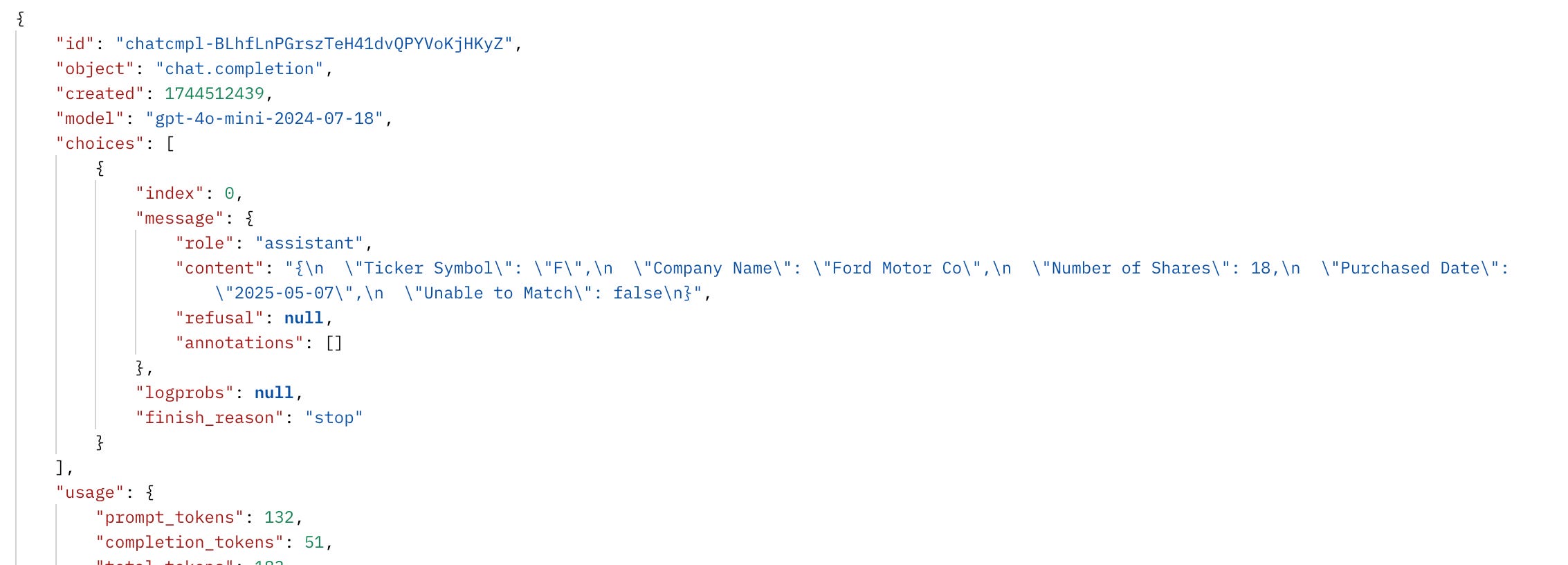
Remember that OpenAI responds back with a multi-nested JSON response as show in the screenshot below. Just like with the flow version, we need to drill down to through the choices array into the messages object, into the content property and then parse that JSON string into a useable format.
Whereas in Python this is a trivial application of the json library, using json.loads() to turn the JSON into a Python dictionary and then using bracket notation to get the JSON string, with Apex, we have to get a little more tricky. Unfortunately, Apex is god-awful and handling nested JSON, which is a shame since most of the internet uses it.
Our solution is blunt, but efficient. We simply repeat our first step and deserialize each nested layer of JSON into a new Map of key-value pairs, while throwing in a list for handling the choices array.

Buckle up, this gets a little funky: Following the parsing of our top-most layer, we can cast the choice property to a list of objects (because it’s an array) into a choiceList variable. From here, we can take the first entry ([0]) of the object and parse its values into a key-value map, giving us the parsedChoice variable, which contains properties such as index, logprobs and message.
But wait, there’s more; the message property is nested yet again. So we repeat the process; casting to a map the message property of the parsedChoice. This gets us another map - parsedMessage - containing the values of the message object, with properties such as role and content.
But wait, there’s moooore. We can now access the content property, but it’s a JSON string! And we need to be able to access its individual properties. So we do this entire process one more time by - <deep breath> - taking the content property from the parsed parsedMessage variable, casting it to a string, taking that string and deserializing it using the JSON apex class and then casting that entire monstrosity to another Map variable called parsedPromptResponse (because this is really the information we care about).
Seriously, Salesforce? All that for some nested JSON. All of the logic above was extrapolated and built out from information on the JSON class in the official Salesforce developer documentation.
Updating the record with parsed data
Luckily the hard part is over. In the final piece of the method, we take those parsed values and assign them to the specific fields on the Stock record, using the .get() method to fetch our value from the property key. Because it all comes back as JSON, we also have to do some normalizing of data using valueOf() functions for integers and dates, as well as converting our text boolean value into a true boolean.
We do this for every object and at the end, do a bulk database update class on the list of Stock records, which commits our updates to the database.

Invoking the class from a ListView
Because somehow this is 2025 and Salesforce still has not given us the ability to invoke Apex from a button click not involving using VisualForce, we’ve got one last class and an uber-simple flow to write for our solution.
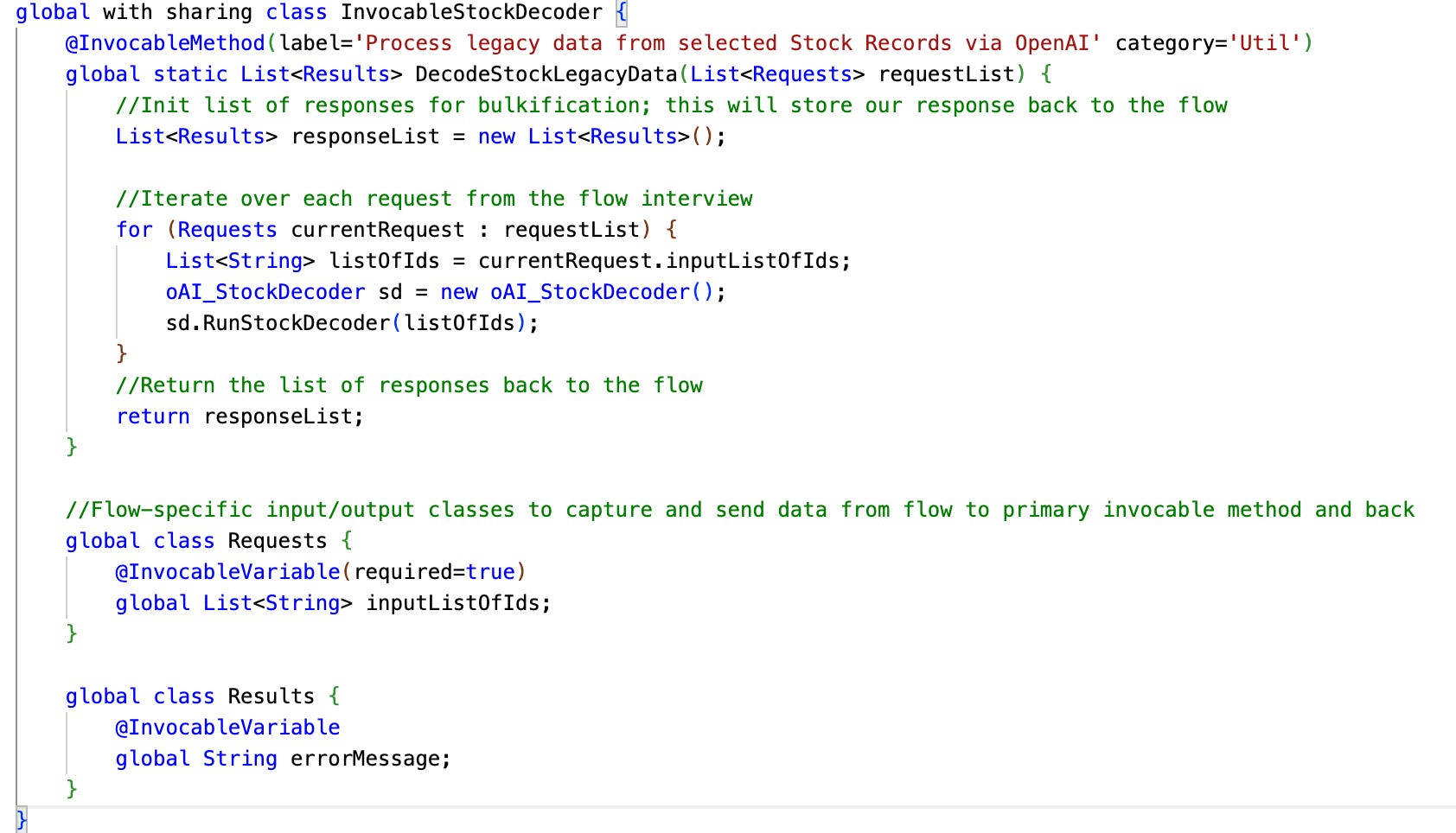
The final class InvocableStockDecoder is just a wrapper around the oAI_StockDecoder class that can be invoked from a flow. There is nothing memorable about this class; it simply takes in a list of Salesforce IDs from each flow interview, uses a basic constructor to create an instance of our oAI_StockDecoder class and calls the RunStockDecoder method, which kicks off the processing. In this specific instance, we don’t even bother returning anything (although I left a hook to return an error if we want to).
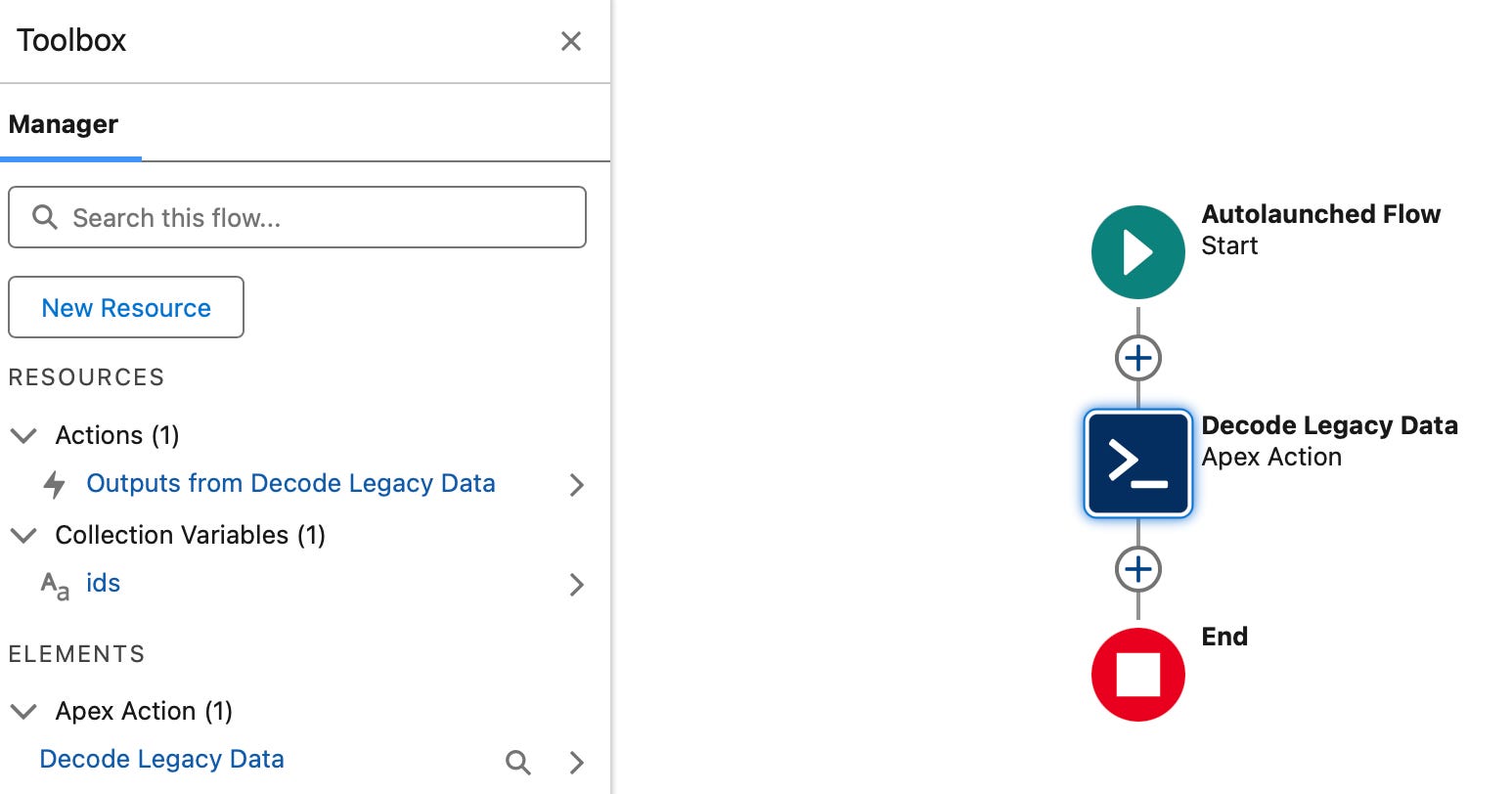
Finally, our sad little flow will be an autolaunch flow triggered from a ListView button. We have an ids collection input variable to capture selected recordIds from the ListView, and a single element in our flow: a callout to our invocable Apex action. That’s it; the entire purpose of the invocable class and the flow is to allow us to call it out in a ListView.
Putting it all together
With all this in place, we’re ready to cook. Using a ListView button calling our flow, we can:
Select a bunch of records from the listview
The triggering flow invokes our Apex class, which creates and calls our main processing class in oAI_StockDecoder
This class sets up parameters and calls out to our two framework classes, which set up the body using passed parameters, make the callout and return the response
Out calling oAI_StockDecoder takes the response, parses the shit out of it multiple times, gets OpenAI’s response to our prompt and sets its values to the Stock record associated with the particular iteration
At the end, records are updated, the flow terminates successfully and our records show the parsed value

Benefits of Apex
So why do this over our flow-based solution in the last post? Honestly…the reasons are not as clear-cut as I had thought they would be going into this thought exercise. I came away amazed that the flow-based solution was arguably just as easy to implement as an Apex solution.
In my mind, the two biggest reasons to go with Apex is granular control and ability to modularize things. Two thirds of this post where about setting up our modular framework - with this in place, the next feature using this functionality would be able to get spun up much quicker by only needing to have the functional class be created (and invoking, if its a list view thing, but even that’s optional).
And there is still a ton of modularization left to improve efficiency (perhaps in a later blog post?). That whole bit about parsing out the response can 100% be abstracted and modularized into a separate class with easy-to-use accessor methods. What about adding the ability to modularly define OpenAI Structured Outputs for our callouts?
With additional buildout to the framework, I can definitely make an argument that in the long run in an organization that plans to use OpenAI in multiple use cases, an Apex-based framework solution would introduce efficiency.
That being said, for one-offs, I found the flow-based approach with the http callout action to be perfectly cromulent and worthy of usage. All that potential efficiency of the apex solution is offset by having to build and maintain said framework library by an expensive developer resource. So maybe it’s all a push, and one should build as they want?